Quick Start
A short guide to go from a handwritten page to editable text in a minute or two.
5 steps: page to post
- Write – Fill a notebook page the way you normally journal. No special paper is required.
- Snap – Open Pen2Post and tap the camera button at the bottom left to take a photo of your page, or choose an existing photo if your device offers that option.
- Extract – After the image is loaded, tap the main Extract Text button (in the main app screen) and wait while your handwriting is turned into text.
- Shape – Read through the text in the big writing area, fix any misread words, and make sure it matches your journal page.
- Share – Tap the round share button at the top right to send the text into your notes app, email, or any other app your phone suggests.
Pen2Post gives you a good rough draft of what you wrote. You stay in control of the meaning, and you make the final edits.
Main buttons on the screen
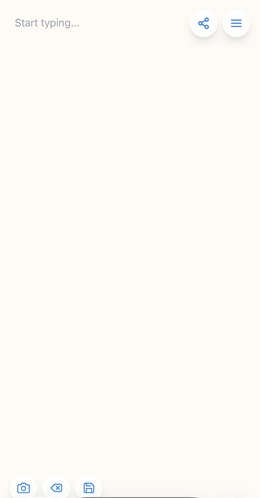
- Top right – Share: sends the text to other apps on your device using the system share sheet.
- Top right – Menu: opens options like About, Quick Start, Help & Tips, Credits & Rewards, Legal Stuff, and Feedback.
- Bottom left – Camera: lets you capture a new photo of your handwritten page.
- Bottom center – Clear: clears the current text and lets you start fresh. Use this only after you have saved or shared your text.
- Bottom right – Save/Copy: copies the text or triggers saving, depending on how your device is set up, so you do not lose your work.
What a typical session looks like
You write a page in your journal, open Pen2Post, tap the camera button, and snap a clear photo. You tap Extract Text, wait a short moment, fix a few words, then use the share button to send the result into your favorite writing or notes app.
App screen preview
The screenshot below shows the main layout: the large writing area, the share and menu buttons at the top, and the camera, clear, and save buttons along the bottom.
Tips for your first page
- Use good, even lighting and avoid strong shadows on the page.
- Write a little larger and clearer than your tiniest handwriting.
- Use dark ink on light paper for best results.
Once you are comfortable with a single page, repeat the same steps for the rest of your notebook.